Showing posts with label Tips-Tricks. Show all posts

Friday, 2 December 2016

6 Things To Know Before Joining An Affiliate Programs

So, you’ve heard about people making money on the internet by promoting other merchant’s products in return for a commission – Affiliate Marketing/ Affiliate programs. You’re keen to test the waters
but not quite sure how to go about it. This article is intended to give some pointers to people starting out in this business. Most experienced Affiliate Marketers will already be familiar with the concepts discussed in this article.

There are many ways to making money online such as Google Adsense, Adsense Alternatives and of course Affiliate programs. Affiliate marketing programs are one of the best ways for a website to make money.


Even internationally renowned business will often utilize affiliate programs as a way of increasing revenue. But before we really got ourselves into any affiliate marketing programs, there are things that we should consider about before joining and here there are :
1. JUDGING THE POSSIBLE RESPONSE

Any individual or business who is considering using affiliate marketing programs needs to be realistic about the potential of each program. The first consideration is to determine whether enough people are likely to see affiliate ads on a website, in social media or in emails.


For a website with little traffic, then signing up to any affiliate program is not going to bring in much commission. In this case it is best to join affiliate programs that offer very high commission.
2. THE NEED FOR RELEVANCE

Websites that have a great amount of traffic can benefit from many affiliate programs as long as they’re relevant to the niche of their site. Being relevant is a key factor in maximizing potential earnings. Placing general banner ads will probably bring results, but fine tuning ads to appeal to readers of a specific page will bring even better results.

For instance, a website about music should have more specific rock music ads on its rock pages and more specific hip-hop ads on its hip-hop pages.
3. CHOOSE RESPECTED AND RELIABLE PROGRAMS

Use affiliate programs that are respected and reliable. Be wary of affiliate programs that are new and which boast about generous commission. A lot of tried and tested affiliate programs have lasted because they work and pay up on time.
4. INTEGRATING AFFILIATE PROGRAMS

Look for affiliate programs that can integrate seamlessly into a website. An example can be a review of a movie, which includes a link to a DVD for sale of that movie. Don’t overload a page with affiliate links, even with programs that make adding relevant links easily.

Social media and emails can be used for posting affiliate links, but this is not a preferred way of using them. By all means consider affiliate programs that allow this to be done easily, but too many posted ads in one day will just be considered akin to spam by many.
5. TEXT AND IMAGE ADS

Judge how ads from affiliate programs will look visually when placed on a website. It’s very important to consider this aspect of affiliate programs.

Sometimes text ads will be more effective than image ads and it’s necessary to consider what type of ads are appropriate in which part of a webpage. Sometimes the subtle approach will work best, but really striking images can also have a great effect.
6. EASE OF USE

Most affiliate programs will be easy to use, but if some programs appear to be too complicated, stick to programs that are less so. Then after some time when you got more experience, try and use the affiliate programs that are more complicated which involve things like embedding into a website.

When deciding on an affiliate program to join, don’t expect instant riches. You’ll learn, over time, what works and what doesn’t, but never just pick any affiliate program and hope for the best. Use programs that can be adapted to fit with your own knowledge and expertise.

Are you with any affiliate programs? What are the things to consider before joining one? Let us know in the comments.

How I Made Rs 50,000/- in 30 Days from Flipkart Affiliate Program


Yes, you read it right. I made approx Rs 50,000/- from Flipkart Affiliate in just 30 days and below you can see the proof in my Flipkart Affiliate account Screenshot. In this is post I will share with you how I made this money from Flipkart and how you can also replicate the same success step-by-step
and make money from Flipkart affiliate for yourself.


Flipkart is a leading ecommerce company in India and offers variety of products from clothes to electronics, all under one roof. I am sure most of you might have ordered something from, or at least browsed through Flipkart’ shopping website; at one point or another.

So far you might have know Flipkart only as a way to spend your money, now let me show you a way to earn money from Flipkart. YES you can earn money from an online shopping site.

There are various ways how you can earn money from Flipkart and I will share all of them with you in this post. I make money from Snapdeal Affiliate too, click here to know how to make money from Snapdeal Affiliate.

This post is for both types of users, those who already have a Flipkart affiliate account, and also those of you who are complete newbie to this game.

For those of you who don’t have a Flipkart affiliate account, check step 3, where I have added a detailed step by step video explaining how you can create your own Flipkart affiliate account. After that, all of us will be on same page, so now that all of us have a Flipkart affiliate account, let’s jump into the game.
1. BECOME A SELLER ON FLIPKART

Have something to sell, put it on Flipkart. Yes you too can sell your products on Flipkart. By prod1uct I don’t means household items. For selling those, you have olx.in. Here I am referring to those of you who are interested in being a businessmen/businesswomen.
There are two ways to find what to sell on Flipkart. 1st is if you already have a product, which you manufacture or make yourself, like handicraft items, clothes, jewellery, fashion accessories and much more, then Flipkart is the place you can sell them.
2nd option is for those who don’t have any product of your own, procure something! There are tons and tons of products out there that are selling at cheaper prices elsewhere, you can procure these products and them upsell them on Flipkart.

Once you have procured the item, you can set your own selling price for it, and add it to Flipkart. This is a cool way to make money, since you will not have to spend anything at all in promoting your product. Flipkart will manage all the advertising. I have helped individuals in making 4 figure profits from their sales on Flipkart. If your product clicks with the audience, sky is the limit to your earning potential via Flipkart.

The process to become a seller on Flipkart is quite straightforward:


Step 1: Register on Flipkart as a seller

Step 2: Provide all information related to the product you want to sell on Flipkart

Step 3: Wait until your application is manually processed and approved

Step 4: Once application is approved, you can list your products on Flipkart

Step 5: Make sales, and earn profit
2. BECOME AFFILIATE OF FLIPKART

Becoming an affiliate means you will be helping Flipkart make more money. In turn Flipkart will share with you certain % of its profits. This is the simplest way you can make money from Flipkart. All you need to do is help Flipkart find more and more buyers.


When you do so and Flipkart makes a sale, it will then share certain profit margin with you for helping it in getting the sale.

As Flipkart has huge range of products, it has classified its products into categories, like electronics, books, clothing… and so on. Affiliate commission of each category is specified by Flipkart from time to time.


The commission percentage can be found in your affiliate account under commission tab; usually it ranges from 1% to 15% of the selling price.
STEP BY STEP PROCESS TO FLIPKART AFFILIATE PROGRAM SIGNUP


Just read the below instructions and find how to get your own Flipkart affiliate account.


1. Go to Flipkart Affiliate Landing Page and Create an Affiliate Account for you by clicking the “Register” button. The account created now is different from the other account you used to buy products from Flipkart. Affiliate account is only to earn commissions, and you can’t purchase using this account.

2. Enter the required details like Email address, password, agree the T&C and click the”Register” button.


3. After Registering, You will be asked to fill in your Contact Details like Address, Phone Number, Website Information and Payment method.

4. If you don’t have a website, Don’t Worry Just Go to Google Program Which Name Is Blogger and Create an Account – > Select Themes -> Now Start Posting your Articles or Just Join WordPress Program for Free.

5. In Payment Information, You have 2 types of payment modes. You can choose EFT or Gift Voucher according to your need. In EFT method, your earnings will be Credited to your Bank Account once you reached the threshold limit. In Gift voucher mode, you can have your earnings as a Gift voucher and you can use the voucher code while buying products in Flipkart.

6. Minimum payment threshold for EFT is Rs.2,500, and Rs.250 for Gift voucher.

7. Once Finished entering the required details, click the “Save changes” button in the bottom of the page.

That’s it! Your Flipkart Affiliate Account is ready to earn money.

STEP BY STEP PROCESS HOW TO MAKE MONEY FROM FLIPKART AFFILIATE PROGRAM
RESEARCH WORK:


Once your Flipkart Affiliate account is in place, next step is research work. For achieving maximum success it is essential that you choose the categories on which you want to focus. You need to decide whether you want to promote all Flipkart categories or you want to focus only on some of them. Here are a few tips to help you take this decision:
Your interest can help you determine which products you will be most comfortable promoting. If you have interest in particular category of products you should choose to work with them, as you will have more knowledge and experience with them. This will enable you to sell those products to others too. E.g. If you have interest in fashion, work with clothes, accessories, and similar categories.
Your skill set is another key indicator that will help you determine which category to work with. For those with more complex skill set, working with all categories might be a viable option, whereas for most of us focusing on few categories which suit our skill set is best bet. If you
Your expertise level in your chosen categories, will impact your success. If for example you choose to work with electronic gadgets category, you should have technical expertise, so as to know and understand which product is better than other, and how it can help buyers. This will enable you to convince more buyers about buying the product.

Once you have decided the category/categories you want to work with, we are all set to start the money making process. But first, you will have to invest some resources in order to maximize your Flipkart affiliate earning potential.

IMPLEMENTATION:

Step 1: You need a blog, or website through which you can reach out to maximum buyers and thus maximize your sales and earning potential too.

Step 2: Deciding on a domain name for your website or blog. Here are a few pointers to help you choose the best domain name:
You can take a direct approach and choose a domain name that talks about what it contains. If you are planning to launch a blog on Gadgets you can choose a name which conveys what will be in the blog, it can be as simple as www.allAboutGadgets.com or myGadgetsblog.com
Other option is to take an opposite approach, wherein your domain name has nothing to do with what it contains. Under this approach, you can choose a domain name as your name (like I have done), as something you love (kiteflying.com), something that would strike a chord with readers (freshideas.com) etc.

Step 3: Buying your domain name. I have found two trusted sellers, whom I keep revisiting for my domains requirements. These are Hostgator & Godaddy.

They are also the largest players in domain space, and hence doing business with them, guarantees smooth transaction and hassle free domain transfer. You can book a .com in 700/- Rs and .in domain in Rs 199/-

Step 4: Once you are done with domain registration; now you need a good blog Hosting services, you need to be very careful while choosing hosting services because if hosting is down this will directly affect your income, hence never go with a cheap hosting plan.

I have done research on hosting providers and suggest the below providers as I use them and I am happy with their services.
Hostgator WordPress Blog Hosting
Bigrock Hosting
Hostgator has this one click WordPress setup button; you can use it to set your blog.

Step 5: Next, you will need a theme for your website/blog. There are many free wordpress themes available; you can install whichever you like.

Step 6: Install SEO Plugins which will help in on-page SEO.

Step 7: Once your blog is ready, you need to start posting content on your blog/website.
Post on the topics which are trending
You will have keep yourself up to date, about the popular products on Flipkart in your category and write about them
Your writing can include guides, suggestion or reviews; you can also compare products within same niche.
However make sure to always give clear winner from amongst the products you have compared. Visitors prefer your article should not be left in the dilemma of which product to buy
Include product affiliate banner under your post

Step 8: Start promoting your blog/website. Work on maximizing visitors to your blog/website. More visitors will mean more profit for you. Do this via:
Various Social Media Platforms
Good link building techniques
MONITOR RESULTS:
Gradually as you accumulate on the number of post, and keep working on promoting your blog; you will find your blog traffic will start improving. As the traffic grows so will your chances of earning from it. Soon you will discover that you are making sales via your Flipkart affiliate account, and before you realize you will be celebrating your first income from Flipkart.

I have shared some of the tips which I used to make Rs 50,000/- in 30 days. Apply them to your website/blog and see your success grow manifold.

Since many people ask me about how to maximize their Affiliate earning, I have done a post on how to use Facebook to make money from Flipkart Affiliate. Read it up and make sure to add your queries in the comments section
MY SUCCESS MANTRAS –

Below are my Tips on How you can quickly start making money from Flipkart Affiliate Program.

  • Make a niche blog, focus on single category only.
  • Run Google Pay per Click ads for your blog. (Remember that as per Flipkart Affiliate Terms & Condition, you cannot run PPC Ads bidding on trademark of Flipkart.com or any variation or misspelling of any trademark of Flipkart.com. Hence don’t run ads for Flipkart products) But you can run ads for your blog & product reviews which you have written.
  • In most of the cases, people check for reviews when the plan to buy the product, hence when they come on your site to check the review, there is high chance of you getting that affiliate sale. So make sure you have review articles on your blog/website.
  • If not a niche blog create a Price comparison website, where people can compare price of a product from various vendors like Flipkart, Amazon, Snapdeal etc. This is very popular concept and companies are making huge affiliate income through this method.
  • Create a Coupon & Discount website, where you provide discounts coupons to audience which is looking for it.
  • How this works? Flipkart issues discount coupons for various products, which buyer can redeem when he makes a purchase and gets the discount. If you can collect all those coupons on your website and offer it, people would like to buy that product from you as you are offering them that coupon code. And this will add income to your Flipkart affiliate account.
  • This is a very important tip, once you create your blog; focus on building high subscriber base. The more subscribers you have, the more visits you will get for your blog post and the more money you will make via affiliate program.
  • You will start making money once you follow these tips however to achieve high ROI, you need help of SEO.
  • You will have to learn more about SEO and you will have to get some authority backlinks for your site or blog to make it rank higher in Search Engine.
  • Run Paid Promotions for your blog during festival season like Diwali, this will generate additional traffic for your blog and will in turn help you make good amount of money from your affiliate account.

Hope above post helped you; don’t forget to leave your comment below.

Flipkart Affiliate Marketing :How to Use Facebook to Earn Money

You must have shopped ample times on Flipkart, and used Facebook to connect with your family and friends quite often. Here we are going to look how you can combine and use Flipkart Affiliate + Facebook to make money online via these two mediums.


In case you do not know Flipkart runs its own affiliate program. Once you join this you can make money by merely helping Flipkart sell its products. Its simple and effective way to make money online.

Beware this is not a get rich quick scheme and it requires hard work and dedication just as any other money making technique. So without any further delay lets get going.
HOW TO SETUP YOUR OWN WEBSITE/ BLOG

To join Flipkart affiliate program you need to have your own website or blog or a application. This is the first step in earning money from Flipkart Affiliate Program. Creating your own blog is the simplest and easiest way to get going with the Flipkart Affiliate program.

I have done a in-depth series on how to create your own blog which covers each and every aspect of blog making in detail. For a quick run through the blog setup process you can check out my post here.

HOW TO SETUP YOUR FLIPKART AFFILIATE ACCOUNT

Flipkart Affiliate is one of the most popular affiliate marketing programs in India. If you have not joined it yet, do so now- Check out my post on how I made Rs. 50,000/- in a month from Flipkart.

Once you have joined the affiliate program, you need to find innovative ways to market your products and make money from it. Here I am going to show you how you can combine Flipkart Affiliate Program and Facebook to make money as an affiliate.

Now comes the interesting part:
HOW TO SETUP FACEBOOK FOR FLIPKART

Decide on the products you want to promote via your affiliate links. Try to choose a set of products that are similar so that you can focus your promotion to a tailor made audience.

Step 1: Create a Facebook group. To do this you need to have a Facebook profile in place. In case you don’t have a Facebook profile, create on right away. In case you have Facebook profiles use it, and create a Facebook group of your own

Step 2: Set the group guilders. As a general setup

– allow everybody to post

– Setup alert to notify you when new posts are made

– Set up medium/strong profanity filters

– Keep an open group allowing anybody to join in, but make sure you are notified when new people join in

Step 3: Invite your friends and family to join the group. Also ask them to invite more family and friends to the group. This is the best organic way to grow your group’s membership.


Step 4: Post regular content on the group. Make sure your content is useful. E.g.: Your group focuses on electronics. Then post about how to maintain electronic. How to choose right electronic products, etc. Keep the content varied. Do not post content from your website or blog only.


Post others content too. Make sure you are adding value to the group at all times. A stagnant group will not attract users or interaction. Post interactive content in form of questions, polls to get the ball rolling on conversations.

Step 5: Keep the group active by encouraging Q&A, conversation, posts etc. by the group members.
COMBINING FACEBOOK WITH YOUR FLIPKART AFFILIATE LINKS

Step 1: Interspersed with the other content, post your affiliate link on the group. Make sure to add information about the product, and why people should buy it. Only posting your affiliate links won’t get any sales.


Explaining about the product, linking it with the member’s needs & demands, and presenting it in a manner that will appeal to your group members is the key to your success.

Step 2: Create event around new product launch/ offers/ sale etc. Invite your group members to join in the event. Also encourage the, to invite in more members. You can also run contest/ giveaways around new product launch.

Step 3: You can use Mass Planner software to automate the process of facebook promotion and get more members join your group. you can check more details here on how to make money using Facebook.

Step 4: Post about your group on other groups with similar interest. This is another amazing way of getting some organic traffic for your group. There is no better way to reach out to like-minded people than posting on other similar groups.


However do this with caution and in a tactful manner, as other group owners might delete your post if they feel you are poaching their audience.

Step 5: Also personalize your group interactions as far as possible. Send out birthday greetings to members. Use @ feature when replying to post. The better you connect with the members the more they will be open to your sales pitches.
CONCLUSION

If you are regular with posting and provide genuinely useful info, your group members will be glad to buy stuff from you.

Maintaining and managing a successful group requires immense amount of time and resources. I use Mass Planner an excellent Facebook tool for this purpose. It allows me to auto approve friends, schedule content for regular posting, send out happy birthday wishes to all my friends and much more.

So this is one of the smart ways you can use Facebook to earn affiliate income from Flipkart. Do write and tell me what’s your favorite method of maximizing your affiliate income?

Friday, 18 November 2016

How to disable new whatsapp update by hiding blue tick mark in whatsapp


Earlier only in Telegram, users were able to check whether receptionist read your message or not. Whatapp has released new update to its app and added that feature too.

New whatsapp update

(1) You can check whether receptionist has read message sent by you or not. 1 tick = sent, 2 tick = delivered, 2 blue tick mark = read.

(2) Even you can check who so ever has read your message in group conversations.


How to update whatsapp and download new update


Method 1: If your phone is still not updated with these above updates, you can go to play store from your android phone –> Search whatsapp –> click on update to update the app.

Method 2: You can open play store in your phone, tap left side menu and choose My apps and ad check whether whatsapp is there in updates list. If yes, you can choose it and update it.
It is very useful feature but some users may find it invading their privacy. Whatsapp has provided privacy options like disabling last seen, profile pic or status but it has yet to provide something to disable blue tick mark. Whatsapp is testing feature to turn off blue tick feature and it will be released in next whatsapp update. Till then you can use below methods to prevent or get rid of blue tick mark.

Disable blue tick mark and group message info from features from whatsapp

Method 1 – Start using Whatsapp Plus

Whatsapp plus is 3rd party application exactly similar to whatsapp. It provides all functionalities of whatsapp and additionally it supports big size media files, customization of contacts screen, use different themes, emoticons, and customization of any screen according to you. You will love to use it.

If you install whatsapp plus then you can get rid of blue tick mark and other users won’t be able to know about whether you read their messages or not. Also other possible way is to not to update whatsapp and continue using the same version you were using earlier. This way also you can hide blue tick mark.

You can check and download whatsapp plus and its updates from here: http://www.4shared.com/mobile/hW_Da6Suce/whatsapp-plus.html

Latest version of whatsapp: 2.11.431

Method 2 – Use Whatsapp Widget or lock screen notifications

If your phone is rooted, you can download and use this Whatsapp widget. When you read received messages through widget, sender won’t get blue tick as you do not have read it through official whatsapp. Download whatsapp widget


Read messages through whatsapp widget

You can download below app to receive and read whatsapp notifications when your screen is locked. This way other users won’t be notified even if you read their messages. This way you can bypass new whatsapp update. Download Echo notification lock screen


Method 3 – Use Pop up notifications


Open Whatsapp –> Go to Settings –> Notifications –> Popup notification and choose always show pop up. Now when you receive any one’s message, read the message through pop up itself. Later don’t click on read or close after reading message, instead click on home button of your phone. This way sender won’t be able to see blue checkmark even if you have read his message.

Turn on pop up notifications


Method 4 – Flight mode and remove app from active apps

Whenever you read new message, don’t read it instantly. First turn off internet connection in your phone –> open whatsapp and read message now –> remove whatsapp from recent apps list . This way you can prevent another user to see blue tick mark for read messages. This method will work as long as you keep your internet connection off. Once you turn on internet, sender will see blue tick mark for the message.

Remove whatsapp from active apps


Tags
whatsapp update

How to use Whatsapp Online(Using Manymo) without using Bluestacks

Whatsapp messenger is world’s most popular messaging and media sharing app. However it is only available for smart phones but not for PC, laptop or tables. But using supporting softwares, we can use whatsapp for pc, tablet, laptop,desktop and even online. Using whatsapp, you can send unlimited
free messages, share videos, audios, contacts etc. Also Group and Broadcast messaging features put whatsapp at the top position among all messaging apps.

Whatsapp messenger is 1 of the busiest app too with active user base of 600 million users. They share 700 million pics and 100 million videos everyday.Whatsapp Stats (Pictures and videos share)


(1) 700 million pictures / day, 100 million videos / day
(2) 29166667 pics / hour, 4166667 videos / hour
(3) 486112 pictures / minute, 69445 videos/ min
(4) 8102 pics / sec, 1157 videos / second

Here, I will show a trick to use whatsapp apk and readily available online emulator to use whatsapp. You don’t have to download any heavy software like bluestacks. Just a working internet connection and whatsapp apk will do a magic. Here you don’t have to download additional software to install whatsapp.Manymo is a website which provides online emulators to use if you register there. You can install any android app after registering there. Whatsapp can be installed and use in online emulators similar way. Read below point by point guide to see how it works.

Whatsapp for PC using simple steps


(1) First you have to download apk file of whatsapp. Go to http://www.whatsapp.com/download/, click on android and then click on download now. Latest whatsapp apk for android will be downloaded to your PC.

Whatsapp for android


Download Whatsapp


(2) Go to https://www.manymo.com/ and sign up on the site.

Sign up on Manymo


(3) Enter your details for sign up, verify your email and sign in to site.


(4) Once you sign in, you will see below screen. Click on Launch Emulators.

Launch android Emulator

(5) Click on Launch with: App

Launch emulator with app


(6) Now, browse the apk file we downloaded through 1st step or drag it in selected box.

Browse android apk file


(7) Once again, choose emulator of your choice. Android Emulator will start in new window and whatsapp for pc will be automatically installed and opened in that emulator.

Launch your favorite emulator

(8) Later start configuring whatsapp and you can start using it.

Agree terms and conditions


Verify your phone no.


Verification in progress


Enter name


Start using whatsapp


(9) Once you are done with configurations, you can use whatsapp any time by logging into manymo.com as you already installed whatsapp on pc. Please make sure that you open emulator with launch with App option. You can see all the installed apps there. You can choose whatsapp and start using it.

Reuse Whatsapp online


Hope you liked this article. So use whatsapp very quickly without installing any supporting software to your pc.

Tags
download whatsapp for pc
install whatsapp without bluestacks
whatsapp on pc

Download and install whatsapp for tablet (Android tablets)

Whatsapp is reached to 600 million users till date and its audience are growing very quickly. It is available for almost all major OS for some smartphone. Also some tweaks, we can install WhatsApp for tablets and PC also.

Official Whatsapp is only available for smartphones. To install Whatsapp for PC, Tablets, either you have to use supported software or make some changes in settings. Below I will show you 2 ways to install whatsapp for android tablets including Samsung tab. You can use any method to use whatsapp tablet version.

Install WhatsApp for tablet | Whatsapp tablet


(1) Download free whatsapp apk from here: Download whatsapp apk

(2) In your tablet, Go to Settings –> Security –> Unknown Sources (Enable this option). Now you will be able to install apk from outside google play store.

Enable option to install external apk file


(3) Double click on downloaded apk file and whatsapp installation will start.

(4) You won’t be able to verify through SMS as your tablet might not be having the sim card. So switch to call verification and verify your number.

Call verification for whatsapp in tablet


(5) You will receive the call with verification call which you have to enter in an app. Once done, you can start using whatsapp for the tablet.


You can try above method in below listed android tablets and install whatsapp on tablet very easily.

(1) Whatsapp for Samsung tablets: Whatsapp Samsung Galaxy Tab 2 311, Samsung Galaxy Tab 3 210, Samsung Galaxy Tab 3 211, Samsung Galaxy Tab 3 310, Samsung Galaxy Tab 3 311, Samsung Galaxy Note 510, Whatsapp Samsung Tab 4, Samsung Galaxy Tab 4 8.0, Samsung Galaxy Tab S 8.4, Samsung Galaxy Tab 4 10.l, Samsung Galaxy Tab S 10.5, Galaxy Notepro 12.2,

(2) Sony tablets: Sony Xperia Tablet Z

(3) Amazon tablets: Amazon Kindle Fire Hd, Amazon Kindle Fire Hd 8.9

(4) Dell tablets: Dell Venue 7, Dell Venue 7 3g, Dell Venue 8, Dell Venue 8 3g


(5) Acer: Acer Iconia A1-811, Acer Iconia B1-a71

(6) Micromax tablets: Micromax Funbook P255, Micromax Funbook P280, Micromax Funbook P365, Micromax Canvas Tab P650, Micromax Funbook Pro, Micromax Funbook Infinity, Micromax Funbook Talk P360, Micromax Funbook Talk

(7) Lava tablets: Lava E-tab Xtron, Lava E-tab Xtron +, Lava E-tab Velo+, Lava E-tab Ivory, Lava E-tab Z7h, Lava E-tab Z7c+, Lava E-tab Z7h+, Lava E-tab Connect

(8) Hp tablets: Hp Slate 7, Hp Slate 7 Voicetab, Hp 10


(9) Lenovo tablets: Lenovo A7-50, Lenovo A7-30, Lenovo Yoga 8, Lenovo Yoga 10, Lenovo Ideatab A1000, Lenovo Ideatab A1000l, Lenovo Ideatab A3000

(10) Asus tablets: Google Nexus 7 (2013) Wi-fi, Google Nexus 7 (2013) Lte, Asus Fonepad 7 Single-sim, Asus Fonepad 7 Dual-sim, Asus Padfone With Dock

(11) Iball tablets: Iball Edu-slide I1017, Iball Slide 3g Q1035, Iball Edu-slide I6516, Iball Slide 3g 7271, Iball Slide 3g 8072, Iball Slide Q9703, Iball Slide 3g-9728,

(12) Xolo tablets: Xolo Qc800, Xolo Play Tab 7.0, Xolo Play Tegra Note

Enjoy using whatsapp tablet version in above tablets.

Tags
whatsapp for tablet
install whatsapp
whatsapp tablet
how to download WhatsApp on samsung tab 4

Thursday, 17 November 2016

300 cool instagram names for your instgram handle

Most popular photo sharing app Instagram is widely used among the generation of today. Instagram is mainly used due to the retro photo filtering options that can easily transform an image into a vintage lookup. Apart from the other social media sites, Instagram also specializes in connecting
people from around the world who carry the same interest.

In this article, you will read,

Features of Instagram
Why is Instagram so popular?
300-400 Cool Instagram names


Good instagram profiles


Instagram offers a mobile app for Android, iOS and Windows Phone platforms. It provides a real-time photo feed on your timeline where you can view the latest photo postings from your connections and network. Meanwhile, you can also like, comment and mark a photo as a favourite. To connect to a friend, you can click on their usernames and hit the ‘follow’ button from their profiles. After you follow them, you can view their latest photos right from your news feed.

Getting “cute Instagram usernames” or handles have become a trending factor for users and everyone prefers using a sexy username which can be remembered by all. In that case, you can do a username search or use the username generator name maker like http://www.spinxo.com/instagram-names to find the right handle for yourself.
How to choose an Instagram username?

Since you’ll be using Instagram publicly for your business/ self-promotion, you need to choose a username very wisely. Nowadays good usernames are very difficult to find, hence you should be very patient to find the catchy one. Username should be shorter, consistent, and simple to read and should be easily remembered by people.

How to modify your current username with the best usernames?


If you like any name from below huge list and if it is already taken then you can try varying the names with below options.

  • To modify your current username, you can add any of the above listed Instagram handles with your name or nicknames to make it look amazing and matching. For example, if your Instagram username is RyanGlaysher, then you can easily make it ‘Ryan_LilShark’ or ‘BadAss_Ryan’ to make it look great. I hope I’m not suggesting which is pretty notorious
  • Moreover, you can also add underscores or dashes to add the clarity in your username to make it look a little unusual and stylish: Snow_Princess, Bond_007
  • You can even try changing the spelling of words: Shyy Doll, Daily Punchh, Hott
Features of Instagram
  • Geotag your photos and map location of others.
  • Tag others in an image.
  • Untag yourself from an image.
  • Organize and manage your filters.
  • Search for people.
  • View public photos in a separate section.
  • Display your profile picture and information.
  • Upload videos.
  • Simple interface, easy to scroll and swipe.
  • Hide photo filters whenever not required.
  • View what your friends like on a separate section.
  • View your liked photos in a separate section.
  • Get push notifications on your friend’s upload, likes and comments.
  • Direct messaging.
How to sign up in Instagram?
To use Instagram, you’ll need to download the Instagram app on your phone. If you are using Android then you can download it from the Google Play Store. iPhone users can download it from the Apple App Store and Windows Phone users from the WP Store.
  • Download and install the Instagram app on your phone.
  • Launch the app and register on it with your email, a good username, name and password.
  • Create your profile with a username (You can choose it from a list of good Instagram names).
  • Start posting.
Why is Instagram popular?
It’s FREE!

The basic gravity that pulls users to install the app is Instagram’s free of cost installation. Instagram is available for free for all smartphone OS. Any feature or options that you use in the app will be free of cost and this is why users are likely to use it as their primary photo uploading app.


Insta uploads


What users want in an app is instantly uploading their images instead of waiting for hours. Any images that you upload in Instagram will be uploaded on your timeline in seconds and your followers can view them in real time. This is how you get instant likes and comments on your uploads.

Unlimited uploads


Instagram offers unlimited photo uploads without any fail. You can upload as much as photos you want. You can also upload unlimited videos in it.

Connect socially

Other than a photo sharing app, Instagram is no less than the popular social networks. It is meant to connect people with images which let them know and understand your life in still images. You can view your friend’s location, profile, photos they like and comment on their photos.

Built for creative people

Bring life and enhance your photos by splashing some creative filters in it. Instagram filters bring a special effect to your images with their improved options that put a retro effect in your photos. If you’ve clicked the image of your new blue trousers then the retro filters can enhance the blue colour with its advanced tools. This will make your image look more original.

It is easy and cool

Get rid of the complicated options and tools like the other photo editing apps. Instagram is perhaps meant for your easiness. Uploading images on Instagram is more of a kind of fun. Simply click and upload the image, crop it and add your preferred filters. Add blurred effects and adjust the brightness; frame it and upload. And you are done. What else can be more pleasing than this?

It’s Ad free

Another thing which makes Instagram easy and beautiful is the absence of annoying ads that many other apps include. Instagram is an ad-free application that looks quite serene and minimal due to the lack of advertisements. It relieves the app from messing up the screen and provides an uninterrupted access to users.

List of top 300-400 good Instagram usernames

Here, I am going to help you find the best and cool usernames of Instagram for guys and girls which you can add together with your real name to make it fun to read at. These username ideas are fun and interesting and shall be ideal for any person of any age group.


Best Instagram names


Cool Instagram names for girls


List of cool usernames for Boys


Cute Sugar


Romeo


Pie sweetness


Born-confused


Angel Girl


Max


Angelberry


Manic Psycho


Awesome chocolate


Squirrel Nuts


Bee


Grey Mare


Beloved


WarSyndrome


Beautiful


Brutal


Garden Heart


The Prophet


Dimples


Muffinhead


Little Miss Piggy


CyberWarrior


Buttercup


CyberKing


Bubbles


Superb guy


Blossom


Wild Born


Bubbly


Technophyle


Groovy angel


Tech Bro


Cutie


Ice Geek


Doodles


Metalhead


Diamond girl


Soul Taker


Emerald Princess


Couch King


Epic angel


Mindless Bobcat


Shy Doll


Passion


Rainbow Doll


Gunhawk


Glitter


Genuine Profile


Honey


Turnip King


Heavenly


AWESOME LYK That


Honeycomb


POTATO LOVER


Honey Bell


NONAME


The internet Princess


NoisYBoY


InstaPrincess


InstaPrince


Jolly


Midnight Rider


Kitty


Little Cobra


Lil Flower


Gunhawk


Love Hearts


Dr. Cocktail


Live Pink


Fake guy


Love Pink


Love Blue


Muffins


Monster


Nightingale


Foxer


Pink Lover


Blue Lover


Rainbow Blooms


Yellow Menace


Girly


Foxface


Babykins


NetFreak


Angel Froggie


Mr. Lucky


Piggy Honeybear


Cuddle Bear


Doll


Cozy button


Honey Blossom Dimples


Dawnofdusk


Kitty Bloom


evil weevil


Rainbow Pearls


Cybertron


Silly Pie


Lime Green Soda


Starry Angel


Cruiser


Twinkie Star


geez


Shy Doll


Toxic


Strawberry Applepie


Mutt


Sugar Hugs


Foxface


Pink Garden


CrazyTroll


Rainbow Colours


Peace Dude


Peppermint Kisses


Scrapper


Penguin Doll


Snow Hound


Passion Fruit


Screwtape


Peach


Roadblock


Oodles


Rooster


Dove girl


Rock


Cool strawberry


Star Shadow


OverKill


Fiddlesticks


Dear angel


Zoropie5


Glamorous angel


TEH CATFACE


Silent Eyes


Bodhi


Meat Duck


GeekStar


Pink Page


SavageClown


Cute sugar


Frozen


Pink Style


Haggy Pie


Perfect Harmony


Tattoo Puncher


Peppermint Candy


Daily Punch


Passion Fruit


Looney Looser


Orange Splash


Just Ice


Oodles


Bean Basket


Lime Green Soda


Hellboy


Lil Puppy Dog


NatureBoy


DamnCute


Hunk


Jelly


Macho Moron


Jelly Bean Brownies


Greek Goat


Kisses


Black Sheep


Kitty Angel


Midnight Rambler


Lemon Honeypie


Midnight Rider


Internet Monster


Cruiser


Haggy Pie


Fastdraw


Honey pie Girl


Gunhawk


Honey cake Blossom


Unused Guy


Honey bear Snowflakes


Cereal Killer


Dark Angel


Cross Thread


Dark Princess


Commando


Dark Lady


RandomIdoit


Lady in Pink


Dark


Angel Wonderland


Gentleman


PrincessLand


SecretAgent


Darling Dragon


Nightmare


Lady Dracula


pooldude


Glamorous angel


Zoropie5


Charming


Prince Charming


Cool bubble


DroolingOnU


CandyRaid


Open heart


Honey Hug


Mad Boxer


tulipsunflowers


glimmer


Rose


Knight


Sunflower


ThornyLife


Maryjane


Reality Bites


Venus


Spiderman


Jelly Hub


Pluto


Princess Weapon


Mars


katty


Earth King


Honey Goldfish


NinjasInPyjamas


Hotcakes


Legal Heartbreaker


Girly


Roadblock


Woman of Hearts


Roadblock


Glowing


Man of Hearts


Goddess


God


InstaGoddess


InstaGod


InstaWoman


InstaMan


Glimmers


Chocolate Thunder


Gorgeous sweetie


Cool Whip


Fairy hot


Suicide Jockey


Dandy


Take Away


Sweet Dandelion


Strange_Evil


Divine


Cashed Jerk


Delicious


Hitch Hiker


Cutlet


Short Circuit


Dr. Angel


Mr. America


Cupid


Couldnt_Find_Good_Name


Cupid of Hearts


Cherub


Crazy


HockeyWain


Cool bubble


CoreFinder


Classy girl


Neurotic


Cookie


Hypnosis


chiquitita


Cybertron


Bliss


Funky Dude


Babykins


Dog Bone


Bear


Fiddlesticks


Angelic Princess


Glow ‘n’ Show


Lil dope


meN@ citY


Cool dora


Frenky dude


Cool pineapple


Bad Ass


Cuteness


PoPkiss


Cutesy


Lil Shark


Fancy doll, angel and glitch


FuNkY mOnEy


Honey Stars Sunshine


Pokie


Happy Sunshine


Long Live King


Shining Bright


Mistalee


Sunflower Baby


e4envy


Pink female


Genius-General


Beating hearts


Famous Guy
I hope you’ll like these good and funny usernames which can be used for any kind of Instagram profile. Most of the time, the screen names are unavailable so I have put these suggestions so that you can use them along with your real Instagram account names. Here are few more good Instagram names for you to refer.
Conclusion
You can use these good usernames as your facebook, twitter, google+, Pinterest, Tumblr, Vk, Flickr usernames. So if you like my suggested unique usernames or want to share something on your own then please mention them in the comments section.

Wednesday, 16 November 2016

How to hide your identity in whatsapp through virtual phone number?

Over the past few years, Whatsapp has made it big in the social networking industry. It is a powerful and effortless way of sending and receiving messages through a smart phone. When compared against conventional messaging tools, Whatsapp has an edge! It is easy to use (few clicks away),

extremely simple, technically lightweight and a complete all-rounder. Most recent updates allow users to share photos, videos and make phone calls. Above all, the foremost tasks can be accomplished on any smartphone with basic internet facilities. Staying in touch and enjoying unlimited chat sessions have become easier with Whatsapp installed in Smart phones.

What Makes Whatsapp Special and Intuitive?

With this being said, the Whatsapp Messenger works on different platforms. This includes Android Smartphones, Windows, iOS and Blackberry. All these operating systems can use Whatsapp without any configurations or pre-settings, since the app depends on data connectivity (nothing more and nothing less). It is quite interesting to note that even an authentic phone number is no longer required to register with Whatsapp. Whenever you face the “whatsapp sms verification failed” problem, you can opt for the solution discussed in this write up. Here are few simple ways to retrieve a virtual phone number, Whatsapp approves in both the PC and Smartphones.

A Trick to Overhead Whatsapp’s conventional Flow!


Techies consider this as a trick that overtakes Whatsapp’s conventional flow of control. On the other hand, commoners regard this as a perfect way to amuse over whatapp’s features, without disclosing their true identity. This has an impact on the app’s safe and secure nature. Nevertheless, for those technical freaks out there, this is another way of exploring through the messenger’s prime features. So, how is it done? Are you pondering is you can make use of Whatapp’s virtual validation? If yes, read on!

“How to get a free phone number for Whatsapp?” is not a complicated question. Instead, it is a simple process that can be accomplished in few split seconds. By following few basic steps, you can access the messenger in your Laptop or PC without the help of a valid contact number. As mentioned previously, you can chat secretly, without pulling out your actual identity. In many situations, this is a useful trick. Just like how some people prefer whatsapping from their computers, this feature will let you verify whatsapp without message and sms anyone with an anonymous yet valid identify.

Steps to get a free phone number for whatsapp
Here is one of the simplest ways by which you can get a virtual phone number for Whatsapp.
(1) Firstly, you should download and install the whatsapp messenger in your desktop, laptop or Smartphone. To access Whatsapp in your PC, you can make use of Blue Stacks. It is a comprehensive program that lets you install Smartphone apps in your computer. Conversely, download Whatsapp into your device. Stop when you reach to phone verification (validation) page. Don’t enter your own no.

(2) Now, you should browse through receivefreesms.com, and pick a virtual phone number. The site has a huge database of contact numbers. The virtual numbers can be found and filtered in accordance with the country code. Hence, you will find a number that is meant for your country!
 

Free sms numbers
(3) As you pick a virtual number, you should enter it in the required fields. This will direct you to the SMS verification page.

(4) Moving on, navigate to receivefreesms.com and click the number you choose. All that you should do is enter this whatsapp verification code in the “Verification” page and validate your profile. This will complete the verification procedure and ends the process of installing Whatsapp without sharing your contact number. Sometimes, you may face technical issues; in such cases, you must re-try with another number.


All messages

It is Effortless! It is Simple! It is Easy!
According to techies, this is a straightforward trick that works perfectly. Very rarely have users witnessed issues while making use of the virtual Whatsapp number. The only drawback in using the whatsapp virtual number is that someone else might have registered using the same number. In such stances, you should go for another number and re-verify. Doesn’t this sound exceptionally simple and straightforward?
Benefits of Using a Virtual Phone Number

By default, Whatsapp users should have a sim card, verify their phone number and start chatting! With the new virtual phone number whatsapp, you can surpass this step. Instead, you must perform few other configurations. Here are few benefits of using this feature:

You can prevent your contacts from being visible to everyone.

You don’t need to worry about getting a sim card or valid phone number.

You can save time from phone verification strategies.

You will be verified, without any time lags or interruptions. This proves to be extremely useful among those who live in rural areas with poor network connectivity. They won’t face any problems like “whatsapp phone number verification failed”.

You can recreate several Whatsapp accounts without any hassles or tussles.
Few Other Options

Apart from receivefreesms.com, there are few other services with virtual phone numbers. These services tend to offer legit numbers for free. Another famous name in this list includes https://www.worldsim.com/virtual-phone-number?___store=usa To explore through World Sim’s virtual Whatsapp numbers, you should Sign Up, enter a security code (will be sent to your mobile number for verification) and login to view the numbers.

Meanwhile, you can verify your account through email too! For this, you should turn on the “Airplane Mode” and request for a verification code. This will leave verification incomplete; thus, an alternative means of verification would suggested, namely through mail.

Few more sites to get free and virtual phone numbers,

http://sms-verification.com/

http://www.receivesmsonline.net/

http://receive-sms.com/

http://sellaite.com/smsreceiver/

Ultimate Bottom Line

On the whole, Whatsapp becomes a lot closer and safer with the help of virtual phone numbers. And, this article would have answered your question on “How to get virtual number for Whatsapp?” With this being said, you don’t need to buy a new sim card to change your Whatsapp number. The trick works well on all phones (cheap or extra expensive) and without much setting changes.


2 Easy Ways To Block/Remove/Disable Youtube Video Ads

YouTube is a most popular video-sharing website and we love Youtube. Everyone watches funny videos, new movie trailers, new songs video, tv serials online video tutorials and much more on YouTube. But the youtube ads coming up in-between the youtube videos seems very annoying. Many
times due to irritating banner ads we stop the videos. YouTube runs these advertisements before and during videos for the purpose of monetization and to generate revenue.

YouTube only allows users to disable ads on their own videos they have uploaded to YouTube. However, there are ways to block such banner ads and video ads. In this article, we will have a glance through 2 ways by which we can block youtube ads.You can choose any method from the following:

Method 1: Disable youtube ads using browser extensions/add-on.
Method 2: Manipulate the code in your browser’s developer console.

Method 1: How to remove ads from youtube videos using browser’s developer console

This is something technical and you need to spend an additional minute or two to get this to work. In this method, you have to write a piece of script (code) in your browser’s developer console.

Steps
(1) Open any YouTube video.
(2)Open the Developer Console in your browser using following keyboard shortcuts combinations.

Google Chrome: Ctrl-Shift-J
Firefox Mozilla: Ctrl-Shift-K
Internet Explorer: F12 and then click Console

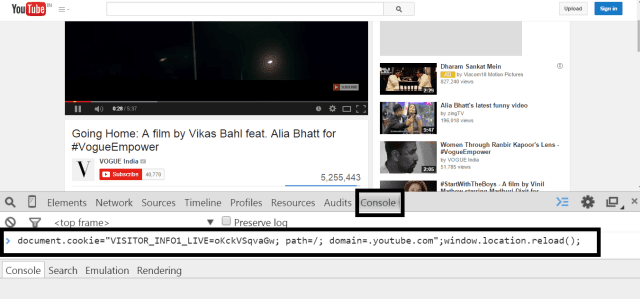
(3) Paste the following code and hit Enter:
document.cookie=”VISITOR_INFO1_LIVE=oKckVSqvaGw; path=/; domain=.youtube.com”;window.location.reload();

Block youtube ads with script


It’s done! This will block youtube ads forever. In future, if you want to enable the ads again due to any reason then you can enable it by writing such script. Follow the first 2 steps and paste the following code and hit Enter:


document.cookie=”VISITOR_INFO1_LIVE=; path=/; domain=.youtube.com”;window.location.reload();

Disclaimer: Most of the time this method will work but sometimes it may not work for some users.

Method 2: How to block/remove youtube ads using third-party browser extensions/add-ons

Browser extensions/add-ons extends your web browser with additional features, modify web pages and integrate your browser with the other services. In short, it provides additional functionality to your browsers. Browser extensions or add-ons to block ads are easily available for all the browsers (Chrome, Firefox Mozilla, Safari, Internet explorer, Opera). Just you have to search specific ads blocker software to stop the ads and download it. After installing the extensions enable it on your browser. The most popular extension or add-on is Adblock. Before going through the tutorial of how to block youtube ads, let’s see the advantages of Adblock.

Advantages of Adblock:
AdBlock doesn’t just hide the advertisements but it stops the ads from being downloaded to your computer.
AdBlock make pages load faster by preventing ad scripts, images and flash videos from being downloaded automatically.
It doesn’t slow down the browser as it hardly consumes any memory.

For every browser, you can find out add-ons to stop ads on youtube videos. Here, for chrome and Mozilla users I will show you the steps of adding the extension.

For Chrome:


(1) Open chrome and go to Settings from the top-right side.
(2) Click Extensions from left menu. You will see all your extensions with their status (enable or disable). Now Scroll down.

Chrome extensions


(3) Click Get more Extensions.

Find extensions to block youtube ads


(4) On Chrome web store, search “youtube ads blocker” and hit Enter.

Search “youtube ads blocker”


(5) In Filters, select Extensions. You will see a list of youtube ads blocker like Adblock for youtube, Adblock, Adblock plus and many more. For chrome, I would suggest Adblock for youtube and Adblock.

Chrome extension to remove ads from youtube videos


(6) Click on +Free corresponding to Adblock for youtube.
(7) In confirm new extension popup, click on Add. It’s done!


For Mozilla:

In Mozilla, extensions are known as Add-ons.
(1) Open Mozilla and go to SettingsàAdd-ons.

Mozilla Add-ons


(2) Search “adblock plus”.


Install Adblock Plus


(3) Click Install.

Once you install the above extension, you will not longer see banner ads while viewing videos.

How to install flash player for iPhone, iPad?


Apart from being the most expensive and preferred smartphone device, Apple hesitated to allow flash player for iPhone and iPad devices. Although it is Apple’s subject of concern for not allocating Adobe player in iOS devices, the main hassle is faced by most iPhone users who are unable to access
flash games on their devices. The reason behind Apple not allowing flash player iOS devices is due to its own business and marketing concern. As you know Apple develops its own hardware and software and never lets any third party manufacturer enter their arena.
Why does Apple not allow flash for iPhone, iPod, and iPad?
The main reason behind the absence of Adobe flash player in Apple is the terms of service agreement prohibits it, as revealed in Wikileaks (https://wikileaks.org/wiki/Why_Apple_Won’t_Allow_Adobe_Flash_on_iPhone). Apple does not pay concern to what their users want, but it focuses on its brand stability. The brand that maintains complete governance over its hardware and software will never allow any third party development tool to take over it. According to an iOS game developer, allowing Adobe flash on Apple devices will violate the developers Terms of Service agreement. Secondly, all Apple devices consider the support of HTML 5 which does not require any flash player.

Still, can you get Adobe flash player for iPad, iPhone?
An innovative iPhone hacker figured out that Adobe flash player can actually be installed in iPhone and iPad devices. This could be a hard hitting matter for Apple, but yet a simple trick can let flash player access your device.


Why do you need iPad, iPhone flash player?
Getting flash player will let you access any flash games, websites or flash videos on your iPhone. In short, you can access the entire web on your iPhone without any interruption. For instance, you are visiting a website which requires flash player to be installed. In that case, having a flash player will let you access its entire contents without having to ask you to install flash player again and again.


How to install Adobe flash player for iPhone, iPad?

To install, you’d require installing Frash. Frash is a flash for iPad and iPhone which is specifically developed for iOS devices. To use this tool you should jailbreak your iPhone and download the .deb. The .deb should be uploaded to a specific folder of your iPhone using SSH. Then restart your phone.

Apart from this process, you can also install Frash from Cydia, which is the jailbreak app store in iOS devices. Remember, you should jailbreak your iPhone before performing this step.

To install “iPhone flash player”, please follow the steps below:
Run Cydia and tap on the ‘Manage’ button.
Tap on Sources > Edit > Add.
A pop-up box will appear where you’ll need to type “http://repo.benm.at/”.


Click on Add Source and close the box.
Tap on the ‘Done’ button.
Go to the Search bar in Cydia and search ‘Frash’.
Click on Frash from the list and install the app.

Now you’ll have flash player installed on your iPhone which you can also switch off when not in use. To save your phone’s battery power, it is better to turn it off most of the time when you are not using flash player.

Besides this, there are a number of flash player apps in the App Store which lets you play flash files on your iPhone and iPad devices.
Best flash player apps for iPad and iPhone
(1) Photon Flash Player for iPad, iPhone, iOS


Photon is a flash browser for iPad and also a private web browser which can play flash video apps and games on your iPad device. This app supports flash browsing with the latest flash player support and provides you all the features that a normal web browser does. Photon is a full-featured web browser which allows private browsing and bookmarks support. Photon flash player is a premium app which available for $4.99 from the App Store.


Photon flash player

(2) Puffin Web Browser

Puffin is an iPhone, “iPad flash player” and web browser which includes Adobe Flash Player over Cloud 24 x 7. With this browser, you can get full access to flash videos and games directly from your iPad and iPhone devices. Puffin is a secured browser which ensures privacy and safe browsing with Cloud protection. Developers keep updating it with the latest flash player updates and provide you a range of incredible features and support. Puffin comes for free from the App Store and supports all iPhone and iPad models, including iPhone 4S and later models and iPad 2 and later models.

(3) Cloud Browse


Cloud Browse is a premium web browser and flash player iPhone, iPad which gives you interactive browsing sessions and allows flash games and videos on your browser. This app supports full Retina Display resolution and any other media which is disabled on iOS devices. The basic installation gives you 10-minute browsing session after which you can upgrade with $2.99.

(4) Virtual Browser (iPad edition)


Virtual Browser is a flash player for iPad, iPhone, iOS which also runs as a virtual Chrome browser. This app supports all Chrome web store apps and extensions with support for Apple flash player. You can run any flash game or watch video through this app and play Facebook flash games like Farmville, Poker games, JibJab, BlueMountain, Adobe Acrobat and lots more. You can even download extensions from the Chrome Web Store and get support for Java too. Virtual Browser lets you customize your browsing experience with custom themes and extensions. You can sync your browser with Chrome, Firefox, IE, etc. to import all you bookmarks, history, and passwords.

(5) Virtual Browser for Firefox (iPhone edition)

Virtual Browser also comes as an Adobe flash player iPhone, iOS, iPad alternative which can run any flash file on your iPhone device. Similar to its iPad edition, you can play any Facebook flash games straight from your iPhone and integrate with any other browser. The virtual browser comes as the free flash player and also with a premium edition with the most standard features and options.

You can use this above-mentioned software and browsers to install flash in all iPhone and iPad models, including the iPhone 3, iPhone 3S, iPhone 4, iPhone 4S, iPhone 5, iPhone 5C, iPhone 6, iPhone 6 Plus, iPad 2/3/4, iPad Mini, iPad Air etc.

Sunday, 13 November 2016

Website Auto Traffic And Ads Clicker Generator Ultimate Software.


Try this ultimate tool to bring traffic and Ads Clicker to your website from different locations in the world! and it is 100% safe for adsense
The world is changing from traditional marketing methods to digital marketing method. People are looking over the web to get their desired products or information. If you throw a stone over the

internet, you will find a lot of same and similar information from multiple resources, we say web pages. People always go for the resources they get quickly with minimum searching. They would be the web pages listed in the first few pages of search results. If a product or website is not known or less known to search engines, they will not be visible in the front of Search Engine Results Pages (SERPS).

Website Auto Traffic Generator is canny standalone tool capable of creating traffic on your blog or website. The tool is clever enough to switch between browsers (but you don't need to install any web browser) and IPs which provides legitimate user traffic to your personal sites. The traffic generator is a good tool to riddle the internet. Even the switching between proxies can be done tool with ultimate version. It has a simple user interface to interact with.

Eminent Features 

>> Generate traffic and rank your sites on top (SEO).
>> 80% Ads Clicker
>> High Earning on your website and Blogger
>> No limit in specifying of URLs and page views/traffic.
>> Gives traffic from different geographic location.
>> Traffic from multiple web browser
>> Advanced switching options for making distinct source.
>> Allows Bulk importing of URLs and Proxies.
>> Option to export URLs and Proxies
>> Live progress status and logging
>> No hidden cost or limitations. One time purchase, lifetime usage support
>> Profiles (you can save settings and no need to import all URLs, proxies etc. on next time)
>> Random session duration for each page
>> Proxy checking (you no need to manually check whether the proxy is working or not)
>> OS and Device different traffic (generate traffic from types of devices like iPhone, Mac, Android etc.)
>> Google Analytics and other web analytics tracking support


What is new in V5.1? 

>> Keywords specific traffic – you can provide keywords and search engines (Google, Yahoo & Bing)
>> Referral traffic – produce referral traffic from Facebook, Twitter & Google+
>> Option to generate Organic traffic specifically as well as Direct traffic
>> Campaign creation and traffic generation
>> Automatic proxy imports from website URLs and proxy validation
>> Creation of own platform combination – based on web browser, OS, device, browser version, OS version etc.
>> Advanced sources switching options - based on time, page count, session duration, proxy count etc.)

Note:
Supported OS: Window Vista/7/8/8.1/10 (32bit or 64bit)

PRICE:$100
Contact me for payment and any other information needed.Thanks
Email:  inicong@gmail.com,
                    admin@inicong.com